Amazon SageMaker Unified Studio integrates data engineering, analytics, and machine learning workflows into a single, governed environment. This integration helps eliminate traditional silos between data teams and ML practitioners, fostering collaboration and efficiency in advancing AI initiatives.
As organizations adopt SageMaker Unified Studio, they must establish best practices for implementing data federation principles across the enterprise. The structure of your deployment is not merely a technical choice; it significantly influences your governance framework, security posture, and operational scalability.
This article delves into the intricacies of SageMaker Unified Studio multi-account deployments, discussing their importance and effective implementation strategies. We will analyze architectural patterns and assess trade-offs related to security, operational overhead, and team autonomy.
For large enterprises, starting with a multi-account AWS environment is common. If beginning anew, consider whether to utilize a single account for all SageMaker components or to create separate accounts for governance and business units. A multi-account architecture aligns with AWS best practices and is beneficial in various scenarios.
Understanding the foundational constructs of SageMaker Unified Studio is crucial before exploring multi-account strategies. Each construct is detailed in the Administrator Guide.
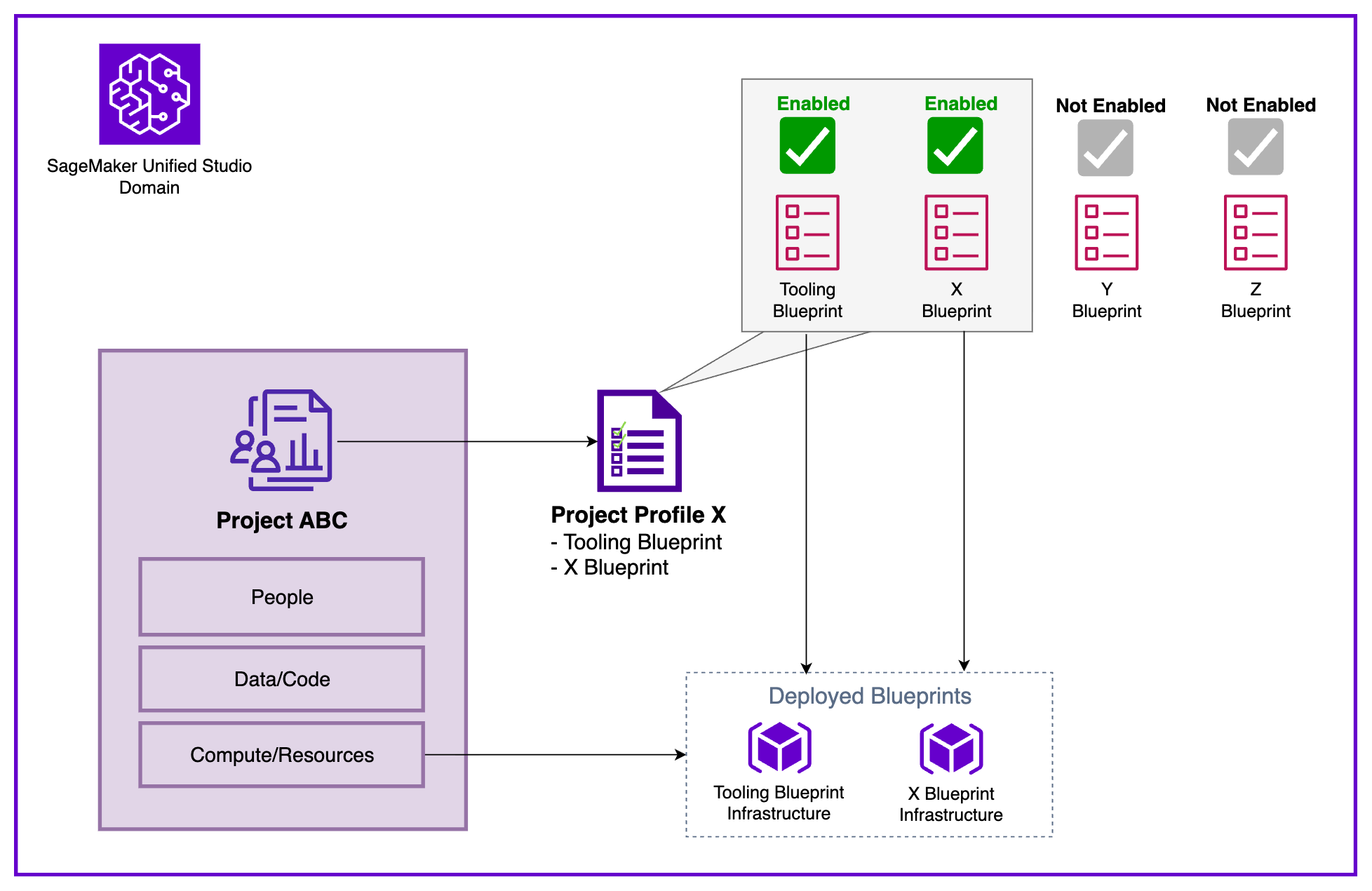
The diagram below illustrates the interaction of key constructs. Within a Domain, users create Projects organized through a single Project Profile, which defines and configures a collection of Blueprints. When a project is initiated, the infrastructure specified in those Blueprints is automatically provisioned for use within the project workspace.
To demonstrate these concepts, we present a sample enterprise organization with multiple AWS accounts representing different business units:
The Central Data Governance Account houses the SageMaker Unified Studio Domain, which contains shared platform resources, governance constructs, and policies. These elements establish the standards and capabilities available throughout the organization, forming the Service-level configuration data.
In contrast, the associated accounts, such as Marketing and Finance, host the actual AWS infrastructure, compute/storage, and data stores provisioned when Projects are created. This separation maintains centralized governance while allowing business units to manage their resources according to specific needs.
To enable effective data science and analytics workflows across multiple AWS accounts, organizations must establish a structured cross-account configuration. This involves four key steps: account association, Blueprint enablement, Project Profile configuration, and Project creation.
Note: For a detailed process overview, refer to How to associate an account when using Amazon SageMaker Unified Studio.
The Domain administrator must associate each AWS account with the SageMaker Unified Studio Domain, enabling seamless cross-account functionality. This association allows the Domain to publish and consume data from associated accounts and create resources within them.
After associating accounts, each administrator must enable relevant Blueprints to ensure Projects can provision necessary tools and resources. Blueprints serve as standardized infrastructure templates, helping maintain consistency and compliance across all Projects.
With accounts associated and Blueprints enabled, the next step is to configure a Project Profile that dictates where Project resources will be deployed. The choice of Project Profile strategy affects both operational flexibility and governance.
Domain administrators can control which Blueprints are included in each Project Profile and specify target AWS Regions and accounts for deployment, providing a governance foundation for standardizing Project creation. Dynamic profiles balance governance with agility, allowing users to deploy resources aligned with business needs.
Creating a new Project from any associated account using the configured profile is the next step. A key challenge is determining when to create a new Project, which significantly impacts collaboration, resource isolation, and governance. A Project should represent a distinct business initiative with a defined scope, dedicated team, and measurable outcomes.
Projects should be created when clear separation is needed across cost allocation, access control, and data governance. For instance, if Finance and Marketing teams require separate budget tracking and data access policies, they should have distinct Projects.
However, avoid unnecessarily fragmenting related work into silos. The separation of governance and working accounts lays the groundwork for a scalable, secure, and compliant data and AI platform.
With centralized governance in the Domain account, organizations can enforce consistent security policies and compliance requirements while allowing sub-accounts autonomy over their resources. This governance-first strategy ensures data remains protected and accessible, empowering teams to drive business outcomes effectively.