The AWS DevOps Agent acts as a reliable operations partner, optimizing application performance and managing site reliability engineering (SRE) tasks across various environments, including AWS and on-premises. It enhances operational excellence by integrating with observability tools to reduce Mean Time To Repair (MTTR).
Organizations often extend the AWS DevOps Agent's capabilities with custom Model Context Protocol (MCP) tools, enabling access to internal services like private package registries and source control systems. However, these services typically reside within an Amazon Virtual Private Cloud (VPC) without public internet access, making them unreachable by default.
To address this, private connections allow the AWS DevOps Agent to securely link to services within your VPC without exposing them to the public internet. This feature supports various integrations, including MCP servers and self-hosted observability platforms.
How Private Connections Work
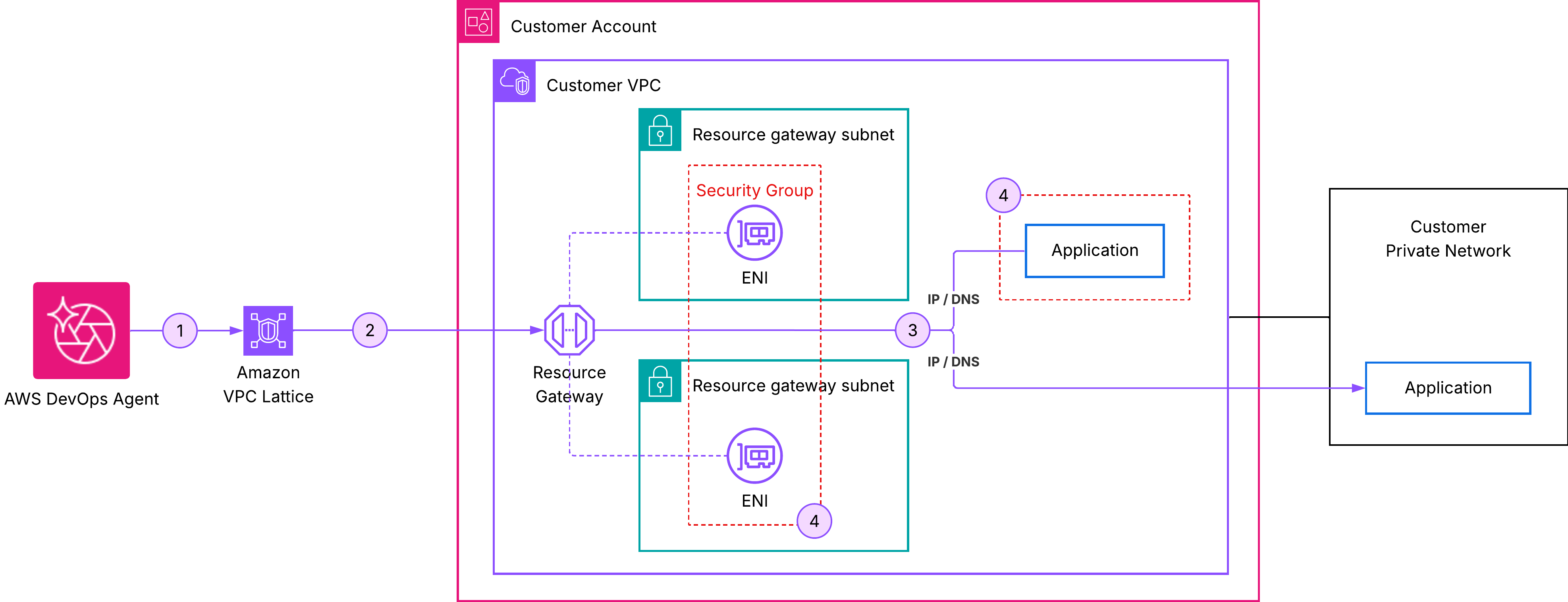
Private connections create a secure network pathway between the AWS DevOps Agent and your VPC resources. Utilizing Amazon VPC Lattice, this connectivity is established without needing to manage the underlying network infrastructure.
Key Features of Private Connections
- The resource gateway is managed by AWS DevOps Agent and appears as a read-only resource in your account.
- Only Elastic Network Interfaces (ENIs) are created in your specified subnets, serving as entry points for private traffic.
- Security groups allow you to maintain control over traffic while preventing inbound connections from the internet.
Setting Up a Private Connection
To create a private connection, follow these steps:
- Open the AWS DevOps Agent console and navigate to Capability providers.
- Select Private connections.
- Click on Create a new connection.
- Configure the connection details, resource location, and access control settings.
- Finally, select Create Connection and monitor the status, which may take up to 10 minutes to complete.
Common Use Case: Integrating with Grafana
A prevalent scenario for private connections is linking the AWS DevOps Agent to a self-hosted Grafana instance. Many teams use Grafana within a VPC for visualizing metrics and logs.
To set up this integration:
- Create a service account in Grafana with Viewer permissions.
- Generate an access token for the service account.
- Ensure the private connection is established before registering the Grafana service with the agent.
Verifying the Integration
Once the private connection is active, test the integration by starting a chat in your Agent Space and asking for recent Grafana alerts. If the agent responds with data, the integration is successful.
For detailed guidance on using the AWS DevOps Agent with Grafana, including integration with AWS Managed Grafana, refer to the AWS DevOps Agent documentation.
Conclusion
Private connections for AWS DevOps Agent provide a secure and managed method to connect to internal services within your VPC, ensuring that all traffic remains off the public internet. For more information, visit the AWS DevOps Agent console.